

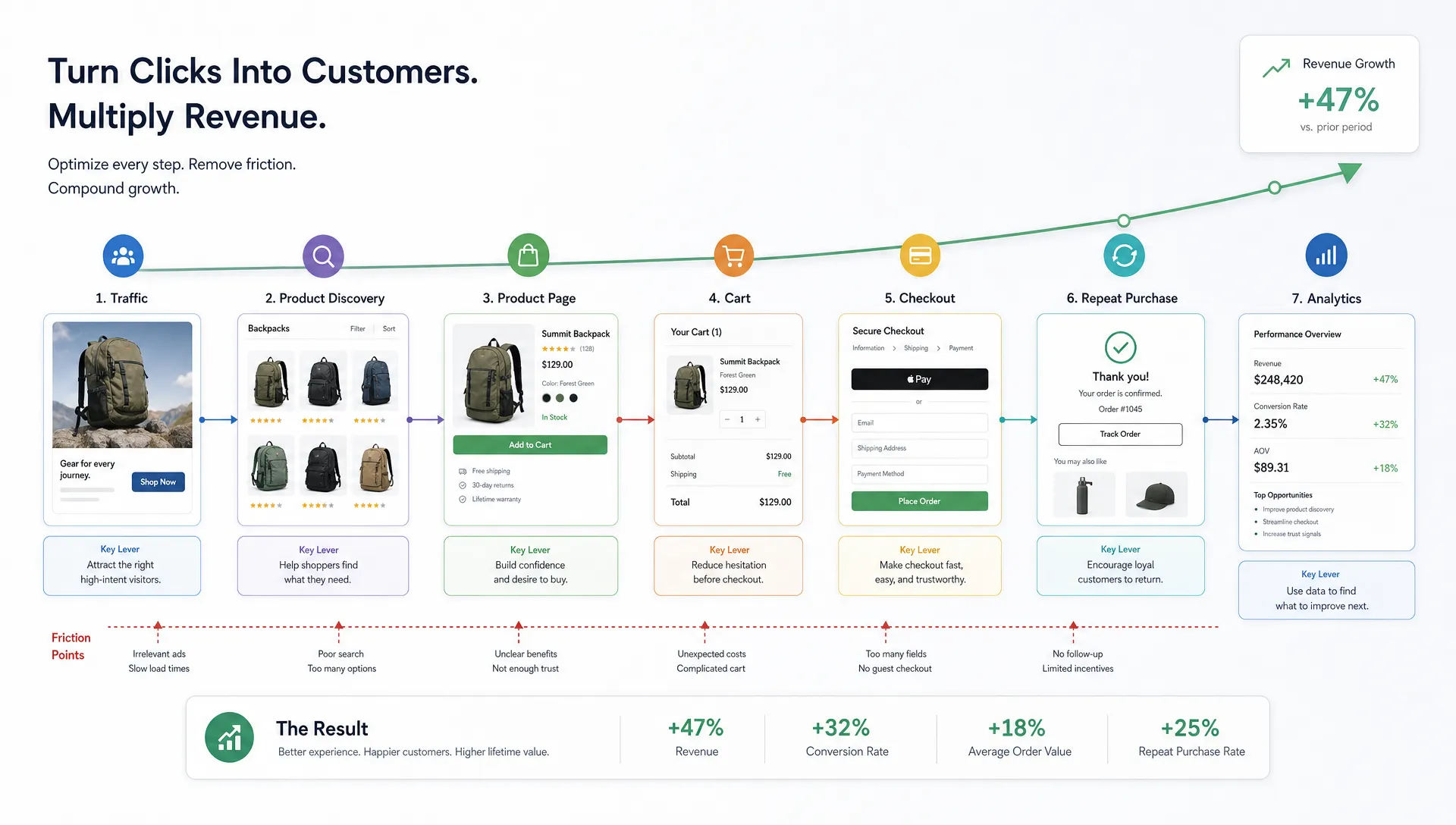
Shopify makes it relatively easy to launch an online store. Faster growth, however, comes from making every visit work harder. That is where Shopify conversion rate optimization becomes a revenue discipline rather than a collection of one-off A/B tests.
For retail teams, the goal is not to squeeze shoppers with louder popups or constant discounts. The goal is to remove friction, strengthen purchase confidence and make the store faster to navigate, especially on mobile. When paid media costs rise and organic competition gets tighter, even a modest lift in conversion can change the economics of acquisition.
A useful way to frame the work is simple:
Revenue = traffic x conversion rate x average order value x repeat purchase rate
Shopify CRO sits in the middle of that equation, but it affects the whole system. A faster site can improve paid media efficiency. Better product discovery can raise AOV. Cleaner analytics can help teams stop funding campaigns that attract low-intent visitors. Growth accelerates when the storefront, traffic strategy and measurement loop improve together.
What Shopify Conversion Rate Optimization Really Means
Shopify conversion rate optimization is the process of improving a Shopify store so more qualified visitors complete valuable actions. In most cases, that means purchases. For some brands, it also includes email signups, account creation, quiz completions, add-to-cart events or subscriptions.
The strongest CRO programs do not begin with button colors. They begin with questions that tie directly to revenue:
- Where are high-intent shoppers dropping off?
- Which product pages attract traffic but fail to convert?
- Which apps, scripts or design patterns slow down the path to purchase?
- Which traffic sources bring shoppers who browse but rarely buy?
- Which customer objections are visible in reviews, support tickets and on-site behavior?
Shopify is flexible, which is a major advantage. It also means stores can accumulate technical debt quickly. New apps, theme edits, tracking pixels, seasonal landing pages and campaign-specific customizations often pile up without anyone measuring their impact on speed or conversion.
A faster-growth CRO strategy treats the Shopify storefront as a living revenue asset. Every improvement should make the shopping journey easier, faster or more persuasive.
Start With Revenue Leaks, Not Random Tests
Random testing slows teams down because every idea competes for attention. A better starting point is a funnel audit that separates symptoms from causes. A low conversion rate is a symptom. The cause might be poor mobile usability, weak product information, slow collection pages, unclear shipping costs or low-quality traffic.
For Shopify brands, the highest-value leaks usually appear in predictable places.
| Funnel area | Common Shopify symptom | Faster-growth fix | Metric to watch |
|---|---|---|---|
| Homepage and landing pages | Traffic bounces before browsing products | Clarify category paths, value proposition and best sellers | Bounce rate, product view rate |
| Collection pages | Visitors scroll but do not click products | Improve filters, sorting, product cards and merchandising | Collection-to-PDP click rate |
| Product pages | Add-to-cart rate is weak | Strengthen imagery, proof, shipping details and variant selection | Add-to-cart rate |
| Cart | Shoppers hesitate before checkout | Make fees, delivery timing, returns and promo logic clear | Cart-to-checkout rate |
| Checkout | Payment or account friction blocks purchase | Simplify payment options and reduce surprise costs | Checkout completion rate |
| Post-purchase | First-time buyers do not return | Improve replenishment, cross-sell and email capture | Repeat purchase rate |
This view keeps CRO connected to business impact. If your biggest leak is mobile PDP performance, redesigning the homepage may feel productive but will not create faster growth. If paid social visitors land on a slow page with generic messaging, testing checkout copy will not solve the core issue.
Make Store Speed a Conversion Lever
Speed is one of the clearest ways to improve Shopify conversion performance because it affects nearly every stage of the journey. Slow pages interrupt browsing, weaken trust and make paid clicks more expensive. Google also uses Core Web Vitals as part of its page experience signals, so performance can influence both conversion and search visibility.
Shopify stores often slow down for familiar reasons: oversized media, heavy third-party apps, duplicate tracking scripts, unoptimized themes and render-blocking code. The challenge is not simply achieving a better score in a testing tool. The priority is making revenue-critical templates faster, especially collection pages, product pages, cart and campaign landing pages.
Start by auditing the templates that matter most. A PDP that receives most of your paid traffic deserves more attention than an old content page that few shoppers see. Then isolate what is slowing it down. Common fixes include compressing images, removing unused apps, delaying nonessential scripts, reviewing font loading, simplifying theme sections and cleaning up legacy code.
Space Dinosaurs has covered this topic in more detail in its guide to website speed optimization fixes that improve conversions, which is a useful companion if performance is one of your main conversion bottlenecks.
Speed work also needs governance. A store can be optimized in January and slow again by March if new apps and campaign scripts are added without review. Assign ownership for app approvals, tag management and theme changes so performance remains part of the operating rhythm.
Improve Product Discovery Before You Redesign Product Pages
Many Shopify CRO projects jump straight to product page changes. That can work, but only if shoppers can find the right product first. Product discovery often has a larger effect on growth because it shapes whether visitors reach a product that matches their need, size, budget or use case.
Collection pages should help shoppers narrow choice without creating dead ends. Filters need to reflect the way customers actually shop. For fashion, that might mean size, color, fit, fabric and occasion. For home goods, it might mean dimensions, material, room, style and delivery availability. For beauty or wellness, it might mean concern, ingredient preference, skin type or regimen stage.
Search deserves the same attention. A shopper who uses site search is often high intent. If search returns irrelevant products, fails on synonyms or hides out-of-stock items poorly, the store loses qualified demand. Review search logs regularly to see what shoppers want and how your catalog responds.
Merchandising can also lift conversion without relying on discounts. Product cards should communicate enough information to earn a click: clear imagery, price, variants, availability, reviews if you use them and key differentiators. For some categories, quick add can reduce friction. For others, sending shoppers to the PDP first supports a more considered purchase.
Build Product Pages Around Confidence
A strong Shopify product page answers the questions shoppers ask before buying. Many PDPs underperform because they look polished but fail to resolve uncertainty. Shoppers need to understand what the product is, why it fits their need, what happens after they order and what to do if it is not right.
High-converting PDPs usually combine clarity, proof and low-friction action. The product title should be specific. Images should show the product from useful angles and in context. Variant selectors should be easy to use on mobile. Shipping, returns and delivery timing should appear near the buying decision, not hidden in a footer.
Social proof should support the decision rather than clutter the page. Reviews, user-generated content, press mentions or expert notes can all help, but only when they are relevant and easy to scan. If reviews repeatedly mention sizing, quality, durability or use cases, bring that language into the page content.
For teams evaluating a broader redesign, Space Dinosaurs explains how UX, mobile usability and merchandising connect in how a Shopify website design company shapes conversion. The key lesson is that conversion gains rarely come from visuals alone. They come from aligning design choices with shopper intent.

Reduce Cart and Checkout Friction
Cart and checkout optimization is a high-intent part of Shopify CRO. By this stage, the shopper has already done the hardest work: they found a product and expressed interest. Losing them now is expensive.
Some friction is obvious, such as broken promo codes or confusing payment errors. Other friction is subtler. Unexpected shipping fees, vague delivery timing, forced account creation, hard-to-edit cart items and unclear return policies can all create hesitation.
Shopify gives merchants access to familiar checkout patterns, accelerated payment options and a widely recognized platform experience. Brands still need to manage the details around that experience. The cart should make order contents, discounts, taxes, shipping thresholds and next steps clear. If free shipping is offered above a threshold, the progress toward that threshold should be easy to understand. If bundles or subscriptions are available, the difference between options should be clear before checkout begins.
On Shopify Plus, teams may have more room to tailor parts of checkout through Shopify's supported extensibility options. For non-Plus stores, the most practical gains often happen before checkout: clearer cart messaging, stronger payment option visibility, better promo-code handling and fewer distracting upsells.
Avoid turning the cart into a sales obstacle. Upsells can lift AOV, but too many interruptions can lower completion. Measure the full effect, not just click engagement on the upsell module.
Optimize for Mobile Buying, Not Just Mobile Browsing
Most retail traffic now includes a heavy mobile share, but many Shopify stores still treat mobile as a resized desktop experience. Mobile shoppers face different constraints: smaller screens, shorter sessions, slower networks and more distractions.
Mobile CRO begins with thumb-friendly navigation, readable text and fast-loading templates. Product images should be easy to swipe. Variant selection should not require precision tapping. Sticky add-to-cart buttons can help when they do not cover key information. Forms should be short, inputs should trigger the correct keyboard and error messages should be clear.
Mobile also changes how persuasion works. Shoppers may not read long blocks of copy, but they will scan structured content. Use short sections for product benefits, sizing, delivery, returns and care details. Accordions can work well when the labels are specific. Avoid hiding essential purchase information behind vague labels like "Details" or "More."
A practical mobile audit should include real-device testing. Desktop browser previews miss common issues, especially with sticky elements, payment buttons, app widgets and chat modules. Test on the devices and connection types your customers actually use.
Manage Apps Like Conversion Infrastructure
Shopify's app ecosystem is powerful, but every app should earn its place. Apps can improve reviews, subscriptions, loyalty, personalization, search, bundles and analytics. They can also add scripts, create layout conflicts, slow down key pages or complicate checkout logic.
A quarterly app audit is one of the simplest ways to protect conversion performance. Review each app against three questions:
- Does this app directly support revenue, retention, measurement or operations?
- Does it add front-end weight to high-traffic templates?
- Is there a native Shopify feature, theme update or lighter integration that can replace it?
This is not about minimizing the app count for its own sake. A well-chosen app that drives measurable revenue may be worth its performance cost. The issue is unmanaged accumulation. If no one knows why an app is installed, who owns it or what happens if it breaks, it becomes a risk to growth.
The same principle applies to tracking pixels and tags. Marketing teams need measurement, but duplicate or outdated scripts can harm performance and data quality. Keep a clean tag management process so acquisition, analytics and site speed do not work against each other.
Use AI Where It Shortens the Path to Purchase
AI can support Shopify conversion rate optimization when it helps shoppers make decisions faster. It should not be added simply because it is available.
Useful applications include better product recommendations, smarter on-site search, guided selling quizzes, conversational commerce, review summarization and customer-service automation for common pre-purchase questions. Each use case should map to a real friction point. If shoppers struggle to choose between similar products, guided selling may help. If they abandon because sizing is unclear, AI-generated style guidance might support the PDP, but only with human review and accurate product data.
Retail teams should be careful with AI-generated claims. Product descriptions, fit guidance and recommendations need to reflect the actual catalog and policies. Misleading content may raise short-term engagement but damage trust, returns and support costs.
AI works best when paired with clean analytics. Measure whether the experience improves add-to-cart rate, conversion rate, AOV, return rate or support deflection. If it only increases interaction without improving business outcomes, it may be adding novelty rather than value.
Align CRO With Traffic Quality
Conversion problems are not always on the storefront. Sometimes the store is attracting the wrong visitors. A paid campaign may promise one thing while the landing page emphasizes another. An influencer campaign may bring curiosity clicks that do not match product pricing. Organic pages may rank for informational searches that are too early in the buying journey.
This is why CRO and acquisition should not be managed in silos. Landing page messaging, keyword intent, ad creative, offer structure and product availability all shape conversion. If a page is built for premium buyers but the traffic expects a discount-led offer, the conversion rate will suffer.
For brands that rely on search as a major growth channel, technical SEO and content intent should be reviewed alongside CRO. A partner such as an SEO agency for small businesses focused on technical SEO and local search can be useful when organic visibility, local demand or search-led enquiry quality needs improvement.
For Shopify stores, the practical step is to segment conversion by source, campaign, device, landing page and customer type. Blended conversion rate is useful for board reporting, but it hides the patterns that drive action. A 2 percent storewide conversion rate may include a 5 percent email conversion rate, a 1 percent paid social rate and a 0.4 percent conversion rate from a new landing page that needs urgent attention.
Build a Testing Cadence That Matches Your Traffic
A/B testing is valuable, but it is not the only path to optimization. Stores with high traffic can run statistically reliable experiments on major templates. Smaller stores often move faster with a combination of analytics, session recordings, user testing, heuristic review and carefully measured rollouts.
The testing method should fit the decision. A minor copy change may not justify a long experiment. A new PDP layout, cart experience or merchandising logic does. The riskier the change, the more evidence you need before rolling it out broadly.
A strong Shopify CRO cadence usually includes weekly monitoring, monthly prioritization and quarterly strategic review. Weekly monitoring catches breakages and sudden shifts. Monthly prioritization keeps the backlog focused. Quarterly review connects conversion work to bigger business changes, such as new markets, new product lines, seasonality or platform upgrades.
Prioritization should balance impact and effort. Use a simple scoring model to avoid opinion-led roadmaps.
| Prioritization factor | What to assess | Example question |
|---|---|---|
| Revenue impact | How much traffic or revenue the issue touches | Does this affect top-selling PDPs or low-volume pages? |
| Confidence | How strong the evidence is | Do analytics, recordings and customer feedback point to the same problem? |
| Effort | Design, engineering, QA and operational cost | Can this be fixed in a sprint or does it require theme architecture changes? |
| Risk | Potential downside to conversion, brand or operations | Could this disrupt checkout, tracking or fulfillment expectations? |
This keeps the CRO backlog commercial. It also helps teams explain why they are prioritizing less visible improvements, such as app cleanup or tracking fixes, over more obvious design changes.
Know When Shopify CRO Services Pay Off
Some Shopify CRO work can be handled in-house, especially if the team has strong analytics, UX and development coverage. The challenge comes when growth slows despite healthy traffic, or when teams keep shipping changes without a clear view of what improves revenue.
Outside support can pay off when there are multiple issues across speed, UX, analytics and theme architecture. It can also help when internal teams are too close to the store to see friction from a shopper's perspective. Space Dinosaurs explores the investment question further in when conversion rate optimization services pay off, including signals that a structured CRO program may be worth it.
The best partner is not just a designer, developer or analyst. Shopify conversion growth sits between disciplines. You need technical performance, customer insight, merchandising logic, UX judgment, reliable measurement and a practical release process.
That cross-functional view matters because most conversion leaks are connected. A slow app may support a marketing tactic. A PDP issue may come from product data. A checkout concern may start with unclear shipping promises upstream. Faster growth comes from solving the system, not polishing one screen.
Frequently Asked Questions
What is a good conversion rate for a Shopify store? A good conversion rate depends on category, price point, traffic source, device mix and customer intent. Rather than chasing a universal benchmark, compare conversion by segment and focus on improving the highest-value leaks in your own funnel.
How quickly can Shopify conversion rate optimization improve revenue? Some fixes can improve performance quickly, especially speed improvements, checkout clarity and obvious mobile issues. Larger gains usually come from a steady optimization program that tests, measures and iterates over several months.
Should Shopify CRO focus on design or development first? Start with diagnosis. If shoppers are confused, UX and content may matter most. If pages are slow or apps conflict, development may be the better first move. Strong CRO usually blends both.
Does improving site speed really increase Shopify conversions? Faster pages reduce friction, especially on mobile and paid traffic landing pages. Speed alone will not fix weak product-market fit or poor traffic quality, but it often improves the performance of every other CRO effort.
Do I need A/B testing for every Shopify CRO change? No. High-risk or high-impact changes should be tested when traffic allows. Smaller fixes, bug repairs and clear usability improvements can often be released with careful monitoring instead of a formal experiment.
Build a Faster Shopify Growth Engine
Shopify conversion rate optimization works best when it is treated as an operating system for growth. Speed, UX, merchandising, checkout, analytics and acquisition quality all shape whether visitors become customers.
If your store has traffic but growth is slower than it should be, start by finding the revenue leaks that affect high-intent shoppers. Then fix the problems that make the buying journey slower, less clear or less trustworthy.
Space Dinosaurs helps retail brands modernize ecommerce experiences with AI-enabled engineering, human-centered UX, performance optimization and ongoing analytics. For Shopify teams that want faster growth without adding more complexity, a structured CRO program can turn existing traffic into more revenue and a more resilient storefront.