

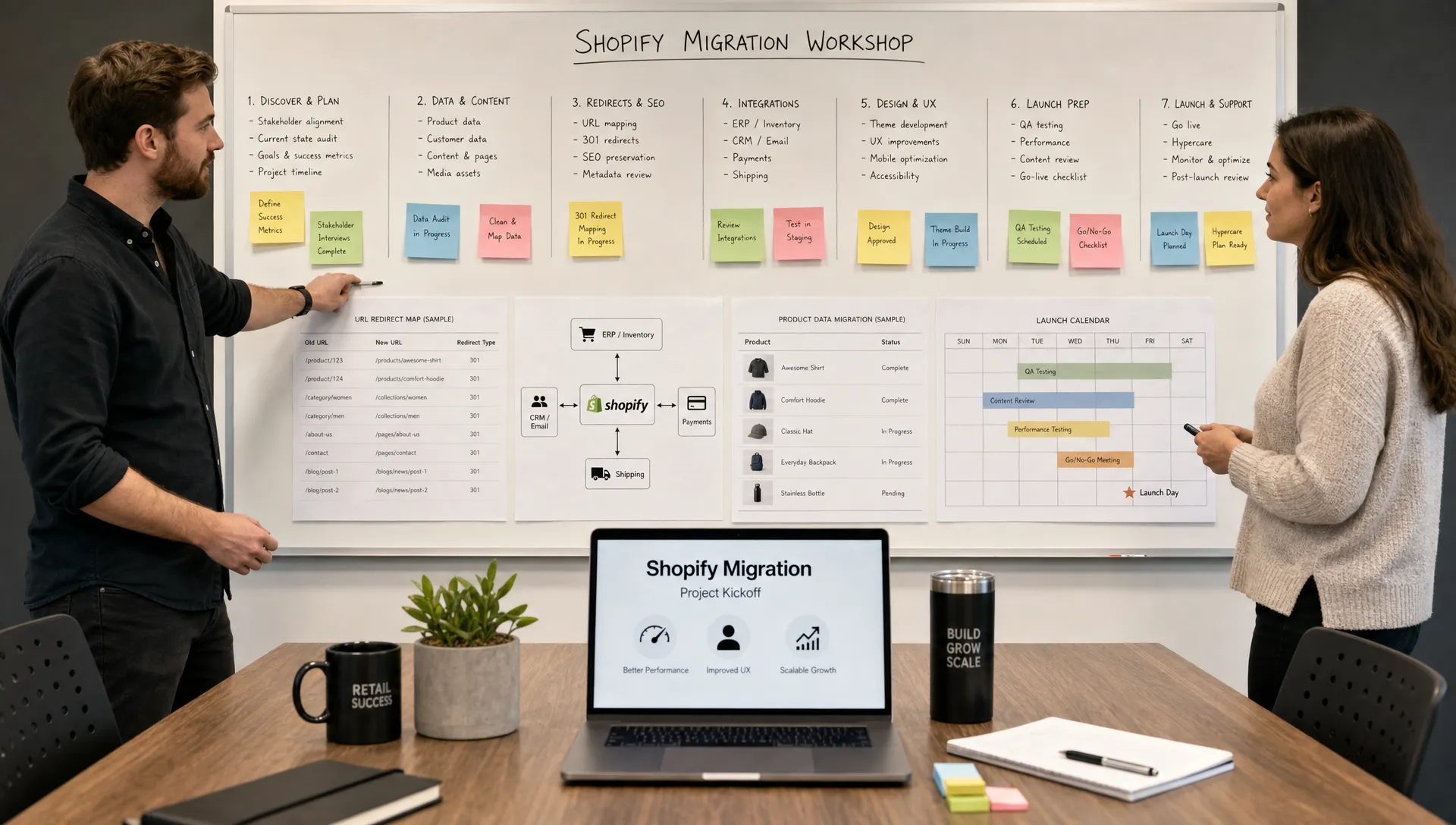
Retailers rarely migrate to Shopify because they want a prettier store. They migrate because the current commerce stack is slowing merchandising, raising costs, limiting search visibility or making basic changes too risky. The right Shopify migration services should reduce that risk with a clear checklist that protects revenue, data, UX and operational continuity from discovery through post-launch optimization.
A migration is not one task. It is a sequence of business, technical, SEO, merchandising, analytics and change-management decisions that must happen in the right order. For retailers with large catalogs, seasonal traffic, loyalty programs, complex fulfillment rules or multiple brands, skipping a step can create expensive cleanup after launch.
This checklist gives retail teams a practical way to evaluate scope, prepare internal stakeholders and understand what a migration partner should own before any code is shipped.
Why Shopify migration services need a retailer-specific checklist
A content site can survive a few broken pages. A retail site cannot afford broken product discovery, missing inventory data, checkout friction or lost rankings on collection pages that drive daily revenue. That is why Shopify migration services for retailers should start with commercial context, not just platform setup.
Retail migrations usually touch every revenue-driving system in the business: product information, pricing, promotions, search, email, reviews, ERP, warehouse workflows, customer service tools and analytics. A clean launch depends on how well those dependencies are mapped before the build begins.
The checklist also creates shared accountability. Marketing knows which URLs and landing pages must be preserved. Merchandising knows which product attributes and filters matter. Operations knows which integrations cannot fail. Leadership knows what tradeoffs are being made around cost, speed, stability and future scalability.
If you are moving from BigCommerce specifically, Space Dinosaurs has a deeper guide on how to migrate from BigCommerce to Shopify without chaos. The checklist below is broader and applies to most retail replatforming projects.
The migration checklist at a glance
Before digging into each phase, use this table to align teams around what must be decided, documented and tested. Shopify migration services become much easier to evaluate when you can see whether a partner is covering the whole migration or only the storefront build.
| Phase | What to confirm | Why it matters |
|---|---|---|
| Strategy and scope | Business goals, platform fit, success metrics, timeline and ownership | Prevents a technical migration from drifting away from commercial priorities |
| Data and catalog | Products, variants, categories, metafields, customers, orders and content | Protects merchandising accuracy and customer history |
| SEO and URLs | Redirect map, metadata, structured data, canonicals and crawl controls | Reduces organic traffic loss and indexing problems |
| UX and theme | Navigation, product discovery, PDPs, cart, checkout and mobile flows | Preserves conversion while improving the shopping experience |
| Integrations | ERP, PIM, OMS, WMS, loyalty, reviews, subscriptions, email and analytics | Keeps daily retail operations running after launch |
| Testing and launch | QA, UAT, rehearsal, rollback logic and monitoring | Catches issues before customers do |
| Post-launch optimization | Performance, conversion, analytics and merchandising iteration | Turns the migration into a growth platform, not a one-time project |
Treat this as a working document. Each retailer will add its own requirements, such as multi-storefront logic, B2B purchasing rules, regional tax needs, gift card migration or store pickup workflows.
Phase 1: define business goals before platform work begins
A migration brief should explain why Shopify is the right move and what the business expects to improve. Common goals include faster site changes, lower maintenance cost, stronger mobile conversion, better merchandising control, cleaner integrations or a more stable checkout experience.
This phase should also decide what will not be included in launch scope. Trying to redesign every template, replace every system and overhaul every merchandising rule at once can overload the project. Good Shopify migration services separate launch-critical work from post-launch improvements so the team can protect continuity without freezing innovation.
Key discovery questions include:
- Which revenue streams must be protected during the migration?
- Which current platform issues are causing the most cost or friction?
- Which integrations are business-critical on day one?
- Which site sections, collections or campaigns generate the most organic and paid traffic?
- Which teams need training before launch?
A retailer should also define measurable success criteria. Examples include stable revenue tracking, clean checkout completion, no material drop in organic visibility, improved Core Web Vitals, faster merchandising workflows or reduced dependency on custom development for routine changes.
Phase 2: audit catalog data, content and customer records
Retail catalog migration is where hidden complexity usually appears. Product names, variants, images, options, metafields, tags, categories and product relationships often carry years of operational decisions. Some are useful. Some are outdated. Some exist only because the previous platform required workarounds.
Shopify migration services should include a catalog audit before data import. This is the moment to clean duplicate tags, normalize product attributes, remove discontinued clutter, validate variant structures and decide which data belongs in metafields. Strong data governance improves search, filtering, product recommendations and future AI-enabled retail experiences.
Customer and order data require equal care. Retailers should confirm which historical records need to move, which data fields are legally and operationally necessary and how customer accounts will be handled after launch. If subscriptions, loyalty points or store credit are involved, the team should document the exact customer experience before, during and after migration.
Content also deserves a proper inventory. Blog posts, buying guides, landing pages, size guides and FAQ content may support organic traffic and customer service. Losing them can hurt both SEO and conversion, even if the product catalog is migrated correctly.
Phase 3: protect SEO, redirects and search visibility
SEO should not be treated as cleanup after launch. URL structures, collection hierarchy, metadata, internal linking and structured data decisions are migration decisions. Once a new site launches, search engines start processing changes quickly.
A migration SEO checklist should cover current traffic-driving URLs, keyword-relevant category pages, backlink targets, canonical logic, robots.txt rules, XML sitemaps and redirect mapping. For a deeper pre-optimization framework, review what a Shopify SEO expert should audit before optimizing.
The redirect map is especially important. It should not be a simple export of old URLs to the homepage. Product pages should redirect to their new product equivalents when possible. Discontinued products may need to redirect to relevant collections or replacement products. Collection pages should preserve intent, not just approximate naming.
Shopify migration services should also verify analytics continuity so SEO performance can be measured after launch. Without clean tracking, teams may confuse a reporting gap with a traffic issue or miss real losses until they affect revenue.
Phase 4: map integrations before design decisions harden
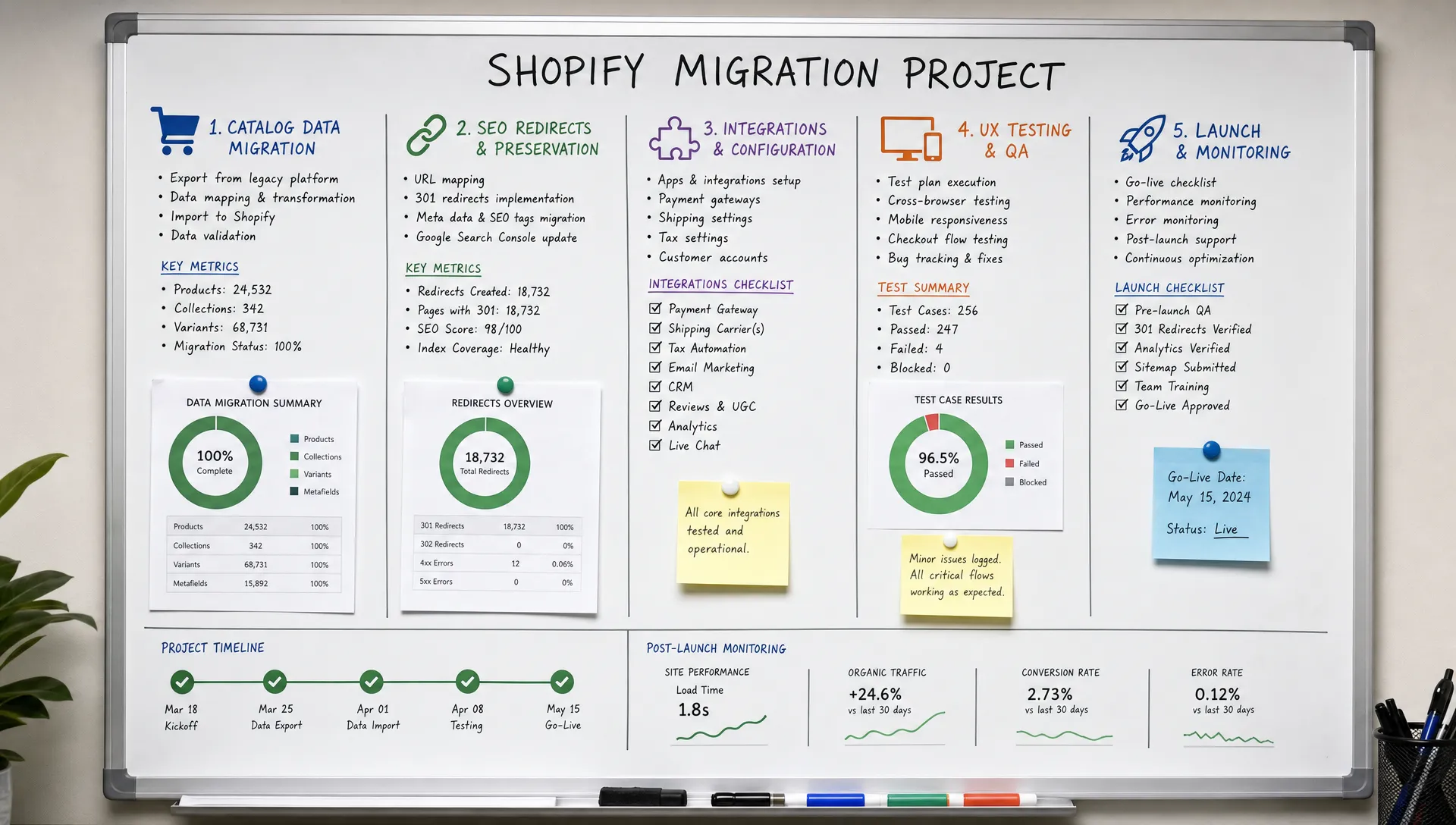
Many migration issues are not caused by Shopify itself. They come from overlooked system dependencies. A product detail page might need real-time inventory. A promotion might depend on customer groups. A checkout rule might depend on tax logic, subscription settings or fulfillment constraints.
Shopify migration services should document every integration, its owner, its data direction, its failure risk and its launch requirement. That includes ERP, PIM, OMS, WMS, CRM, POS, email, SMS, loyalty, reviews, subscriptions, returns, fraud tools, customer service tools and analytics platforms.
A simple integration inventory should answer four questions: what data moves, how often it moves, what happens if it fails and who fixes it. This prevents teams from discovering late in QA that an app, API or middleware workflow is essential to daily operations.
Retailers should also use this phase to evaluate app governance. Shopify has a strong ecosystem, but too many overlapping apps can create performance issues, data conflicts and maintenance overhead. A migration is a good time to simplify the stack, remove redundant tools and choose fewer systems with clearer ownership.
Phase 5: design for product discovery and conversion
A migration is an opportunity to improve UX, but redesign should not erase what already works. Retailers need to understand which navigation paths, collection pages, search behaviors, product cards and PDP elements currently help customers buy.
Strong Shopify migration services connect UX decisions to shopper behavior. Navigation should reflect how customers shop, not just how the internal catalog is organized. Filters should use clean product attributes. Product pages should answer the questions customers need before adding to cart, such as fit, compatibility, dimensions, materials, shipping timing or return rules.
Mobile experience deserves special focus. Many retailers see mobile traffic outpace desktop traffic, but mobile conversion often lags when search, filtering, image loading or checkout steps feel slow. Design and engineering teams should test the full journey on real devices, not just in desktop preview mode.
Performance should be part of design, too. Large images, unnecessary scripts and excessive app embeds can slow the storefront. Space Dinosaurs often treats performance, UX and analytics as connected disciplines because speed improvements are most valuable when they support measurable revenue outcomes. If growth is the priority after launch, this guide to Shopify conversion rate optimization explains where retailers typically find leverage.
Phase 6: rehearse launch like a retail operation
A launch plan should read like an operational runbook, not a loose calendar invite. Every stakeholder should know what happens before DNS changes, what happens immediately after launch and what issues require escalation.
Shopify migration services should include at least one launch rehearsal for complex retailers. A rehearsal validates data import timing, redirects, checkout, payment methods, taxes, shipping, integrations, analytics and customer communications. It also clarifies who has approval authority if launch-day issues appear.
Your launch checklist should include:
- Final content freeze and data sync timing
- Redirect import and validation
- Checkout, payment, tax and shipping tests
- Order flow testing through fulfillment systems
- Analytics, pixel and KPI validation
- Customer account and email notification checks
- Post-launch monitoring assignments
Timing matters. Avoid launching during peak sales periods, major campaigns or seasonal inventory changes unless there is a compelling business reason. If the site supports multiple brands or regions, consider whether a phased launch reduces risk.
Phase 7: monitor, stabilize and optimize after launch
The first 30 to 90 days after launch are not just for bug fixes. They are where the migration proves whether it created a better retail engine. Teams should monitor revenue, conversion, traffic, site speed, checkout completion, search usage, zero-result searches, returns-related questions and integration errors.
Shopify migration services should include post-launch support because some issues only appear under real customer behavior. Search engines need time to process redirects. Customers interact with filters in unexpected ways. Merchandising teams discover which workflows are faster and which need adjustment.
Create a weekly review cadence at the start. Look at analytics, support tickets, heatmaps if available, search queries and operational feedback. Prioritize changes that remove revenue friction or improve team efficiency. Cosmetic refinements can wait if checkout, discovery, performance or data quality needs attention.
This is also the right time to move from migration mode into continuous optimization. AI-assisted merchandising, conversational commerce, personalization, improved analytics and performance tuning are easier to pursue once the foundation is stable.
How to evaluate a migration partner
The partner you choose should be able to discuss retail tradeoffs, not only Shopify features. Ask how they handle data cleanup, SEO risk, Core Web Vitals, integration mapping, QA, analytics validation and post-launch optimization. If the answer is only a theme build and app setup, you may still need additional strategic and technical support.
A useful comparison is any complex build where sequencing and accountability matter. In physical construction, a turn-key contractor such as Summit Barndominiums & Outdoor Living coordinates work from foundation through finish-out so owners are not left managing disconnected trades. Retail replatforming has a similar lesson: one accountable roadmap reduces gaps between strategy, engineering, UX, data and launch execution.
Shopify migration services should also be transparent about what stays custom, what uses native Shopify functionality and what depends on apps or external systems. Customization is not bad, but unnecessary custom work can increase maintenance cost and slow future changes.
For retailers that need a partner with both strategy and delivery depth, Space Dinosaurs focuses on e-commerce builds and maintenance, performance optimization, human-centered UX, analytics and AI-driven retail experiences. The goal is not just to move a store. It is to modernize the retail experience in a way the business can operate and improve over time.
FAQ
How long does a Shopify migration usually take for a retailer? Timeline depends on catalog size, data quality, design scope, integrations, content volume and approval speed. A simple migration can move faster, but complex retailers should plan enough time for discovery, data cleanup, testing and launch rehearsal.
What is the biggest risk during a Shopify migration? The biggest risk is usually not one technical bug. It is poor planning across SEO, data, integrations and operations. Missing redirects, inaccurate product data or broken order flows can affect revenue quickly.
Should retailers redesign during a migration? A redesign can be valuable, but it should be grounded in customer behavior and commercial goals. If the timeline is tight, preserve proven journeys first and schedule larger UX improvements after launch.
Do Shopify migration services include SEO work? They should. At minimum, migration scope should include URL mapping, redirects, metadata preservation, structured data review, sitemap checks, analytics continuity and post-launch monitoring.
When should a retailer start post-launch optimization? Start immediately after launch, once critical stability checks are complete. The first weeks provide useful data on speed, conversion, search behavior, merchandising workflows and integration performance.
Turn your migration checklist into a retail growth plan
A checklist is only useful if someone owns it. Before selecting a partner or setting a launch date, align your team around the business outcomes, operational dependencies and customer experience you need Shopify to support.
If you want help planning a migration that protects revenue while modernizing your commerce stack, Space Dinosaurs can help connect strategy, engineering, UX, analytics and ongoing optimization into one practical roadmap. The best migrations do more than change platforms. They give retail teams a faster, more stable foundation for growth.