


A shopper lands on your product page with one question: is this the right purchase for me? To improve ecommerce conversion rate, the page needs to answer that question without making the shopper hunt for sizing, delivery costs or proof that the product works for their needs. More persuasive copy cannot compensate for a broken size selector or an unexpected shipping charge.
This guide focuses on product detail pages (PDPs), not the entire shopping funnel. It covers how to diagnose hesitation, make buying decisions easier and test changes against completed purchases rather than button clicks alone.
1. Find where product-page visits stop becoming purchases
Start with a product-page funnel, segmented by device and product category. Track product views, add-to-cart events, checkout starts and purchases. If you use Google Analytics 4, events such as view_item, add_to_cart, begin_checkout and purchase can support this analysis, provided item identifiers remain consistent.
Define your denominator before comparing results. One useful product-page metric is:
PDP purchase conversion rate = sessions that viewed and purchased the same product ÷ sessions that viewed that product × 100.
Decide whether “same product” means a parent product or an exact variant, then apply that definition consistently. Count each qualifying session once. This metric differs from sitewide conversion rate, which includes sessions that never reach a product page.
Use funnel patterns to choose what to investigate, not to declare a cause:
| Pattern | What to investigate |
|---|---|
| Product views but few cart additions | Product suitability, price clarity, missing information or selection errors |
| Cart additions but few purchases | Delivery charges, payment friction or checkout failures |
| Mobile underperforms desktop for comparable traffic | Layout, interaction problems or loading delays |
| Purchases rise alongside returns | Misleading imagery, sizing uncertainty or expectation gaps |
Compare like-for-like traffic. A campaign attracting new shoppers to an unfamiliar category should not be judged against returning customers replenishing a favorite product.
2. Build a first screen that helps improve ecommerce conversion rate
The first screen should establish what the product is, what it costs and how to buy it. On mobile, that usually means balancing the main image with the product name, price, essential options and purchase action. Avoid letting a promotion banner consume most of the usable space.
Make the product name descriptive enough to confirm the landing-page promise. A shopper arriving from an ad for a waterproof commuter backpack should immediately see whether the product matches that description, not just an internal model name.
Keep the main purchase action visually distinct. Secondary actions such as wishlists, financing details and store availability should remain accessible without competing equally for attention. A subscription option should explain its terms rather than silently changing the purchase type.
A sticky purchase bar can help on long mobile pages, but it must reflect the selected variant and current price. If a required size is missing, take the shopper to the selector and explain what is needed. Do not create a prominent button that fails without feedback.
Judge the first screen by decision readiness, not by how many elements fit above the fold. Some products need an early compatibility warning or fit explanation more than another promotional badge.
3. Use product media to answer specific buying questions
Product photography should do more than make an item attractive. Each image should resolve a question that could otherwise prevent a purchase.
For a bag, that might mean showing its scale on a person, the internal compartments and how it fits a laptop. For furniture, shoppers may need dimensions, material close-ups and a view that makes the footprint understandable.
To improve ecommerce conversion rate with product media, audit what the gallery proves rather than simply adding more images. Useful coverage often includes:
- Scale: Show the product beside a familiar object or in its intended setting.
- Details: Make materials, fasteners, ports or construction visible.
- Use: Demonstrate how the product functions in a realistic situation.
- Variation: Show the selected color or configuration accurately.
Keep essential specifications in readable text as well. Dimensions embedded only in an image can be difficult to inspect on a phone and inaccessible to some shoppers.
Make thumbnails, swipe controls and zoom usable without guesswork. Test whether changing colors updates the gallery correctly and whether browser navigation preserves the selection. A shopper should not need to wonder whether the blue product shown in the cart is the black version they selected.
4. Replace generic descriptions with decision-making information
“Premium quality” and “designed for everyday life” tell shoppers little about whether a product suits them. Translate claims into concrete details that your product data can support.
For apparel, explain measurements, fabric stretch, care requirements and fit characteristics. For electronics, identify compatibility, power requirements and what comes in the box. For furniture, clarify assembly, access requirements and material care.
A useful way to improve ecommerce conversion rate is to mine existing customer questions for missing answers. Review support tickets, on-site searches, return reasons and product questions. Repeated questions about whether a charger is included belong on the product page, not only in a support article.
Organize information by the shopper’s task. Short summaries can introduce the essentials, with clearly labeled sections for specifications, fit, care and compatibility. Avoid hiding purchase-critical restrictions inside a generic “More information” accordion.
AI can help turn approved specifications into draft summaries or group recurring questions. Human review still needs to verify every claim. Do not let generated copy invent certifications, compatibility or performance benefits.
Finally, say who the product is not suitable for when that matters. Preventing an unsuitable purchase can protect margin and trust even when it reduces immediate orders.
5. Show the full buying commitment before the cart
Shoppers evaluate more than the displayed price. Delivery timing, shipping charges, return conditions and recurring-payment terms all affect the commitment they are making.
Place concise delivery and returns information near the purchase area. If an estimate depends on location, let shoppers provide a ZIP code rather than showing a promise that may not apply. Distinguish dispatch time from arrival time and qualify estimates where inventory or destination affects them.
You can improve ecommerce conversion rate by making uncertainty smaller, but only if the information is accurate. A confident delivery claim that the operation cannot meet is not an optimization.
For example, a hypothetical furniture page could explain: “Delivery estimate available by ZIP code. Assembly required. Return collection fees may apply.” The exact wording must reflect the retailer’s actual policies, with a nearby path to the details.
Reviews should also help shoppers evaluate suitability. Make it possible to find relevant experiences, such as fit feedback or comments about a particular use case, when your review system supports that functionality. Label incentivized reviews appropriately and do not manufacture urgency or customer activity.
Keep trust signals specific. Recognizable payment options, accessible customer support and clear policies are more useful than a row of unexplained security icons. The aim is informed confidence, not decoration.
6. Treat variant selection as part of the sale
A product page can look polished while failing at its most important interaction: choosing an available item.
Test every selection state, including unavailable combinations, missing selections, low stock and inventory changes between page load and cart addition. Use visible text labels for colors and sizes, not color swatches alone. Make the selected state distinguishable without relying exclusively on color.
When teams try to improve ecommerce conversion rate, variant behavior deserves the same attention as headlines and images. The selected option should consistently update the price, media, availability and cart item. Deep links from campaigns should also resolve to the intended variant when supported.
If a shopper submits an incomplete selection, explain the problem beside the relevant control and move focus appropriately. Preserve choices after an error. A generic notification at the top of a long page may never be seen.
For unavailable items, offer an honest next step, such as an available alternative or stock notification if those capabilities exist. Do not substitute another size without explicit consent.
Pay particular attention to bundles and personalization. Display what is included, which selections are mandatory and how each choice affects the total. Complexity should reflect the product’s real requirements, not the structure of the back-end catalog.
7. Test the mobile page as a customer would use it
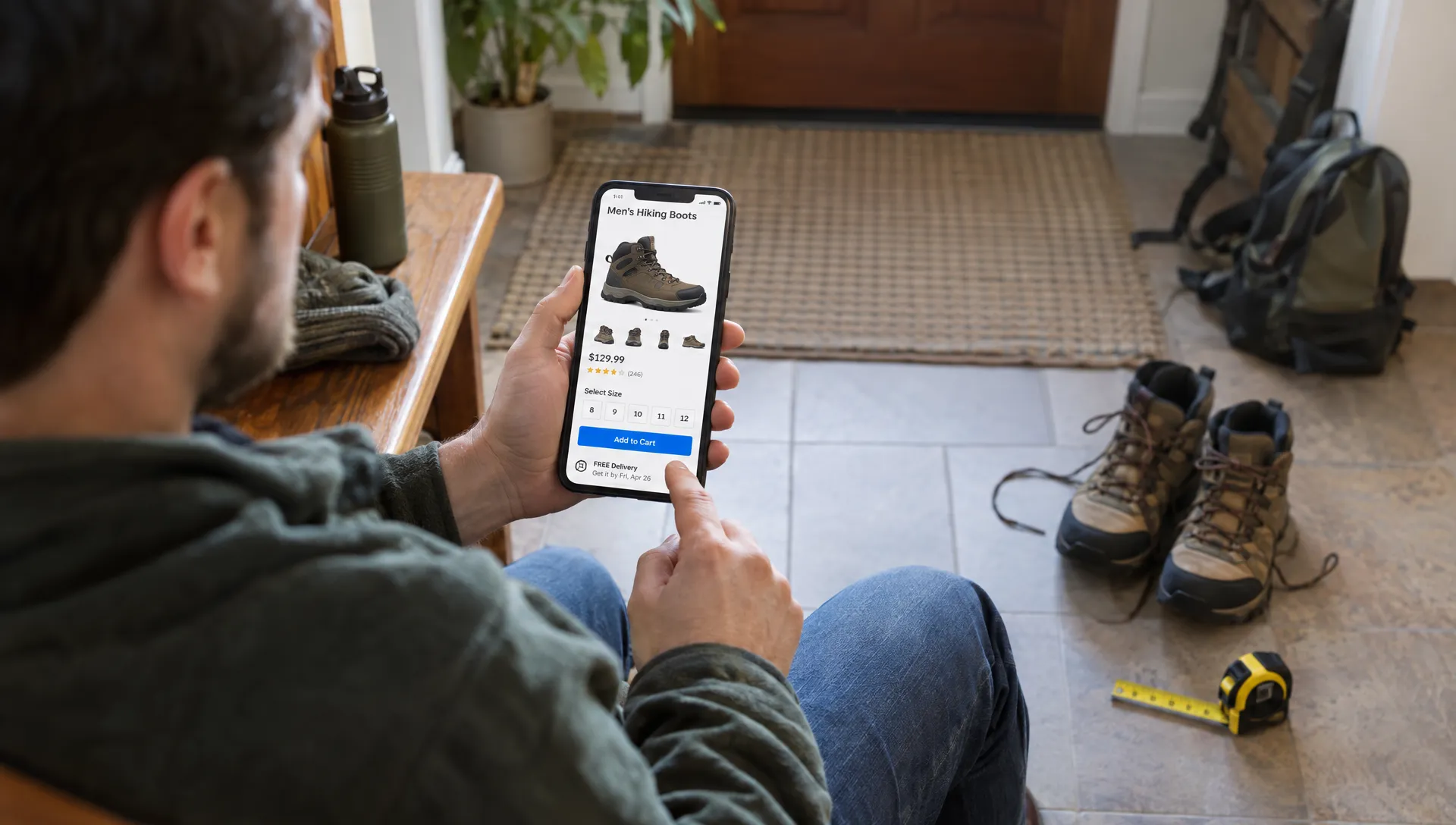
Desktop previews miss problems caused by touch input, browser controls, keyboards and small screens. Test representative product pages on physical phones, including an older device and a constrained connection where practical.
Follow a realistic task: arrive from a campaign link, inspect an image, check dimensions, choose an option and add the product to the cart. Watch for overlays covering controls, text that requires zooming and chat widgets obscuring purchase buttons.
A practical way to improve ecommerce conversion rate is to observe where shoppers have to stop and repair the interaction. They may close several pop-ups, scroll back to a size guide or reselect a variant after opening another section. Those interruptions are often more actionable than a broad request to “make the page cleaner.”
Also check keyboard navigation, visible focus, labeled controls and clear error messages. Purchase confirmation should be communicated accessibly, not only through an animation.
Retailers with physical stores or local pickup can complement this work with a customer-perspective website and Google Business Profile review. That broader check can help identify mobile contact and listing inconsistencies, but it does not replace product-page usability testing.
8. Make product-page performance an interaction requirement
A page is not ready to sell merely because something appears on screen. Shoppers need images to load, options to respond and the layout to remain stable while they act.
Google’s Core Web Vitals guidance defines good thresholds as Largest Contentful Paint of 2.5 seconds or less, Interaction to Next Paint of 200 milliseconds or less and Cumulative Layout Shift of 0.1 or less. Evaluate these at the 75th percentile of real page visits, separating mobile and desktop.
To improve ecommerce conversion rate through performance work, connect those measurements to the purchase journey. A delayed hero image affects inspection, slow variant controls interrupt selection and layout shifts can move the purchase button under a shopper’s finger.
Common PDP fixes include correctly sized images, reserved space for media and widgets, deferred below-the-fold content and fewer unnecessary third-party scripts. Do not lazy-load the main product image when doing so delays the page’s primary visual content.
Review loading and error states as well. Prevent duplicate submissions while an add-to-cart request is processing, then confirm success or explain failure. Space Dinosaurs’ guide to website speed fixes that support conversions covers the broader performance work behind these improvements.
9. Test one product-page hypothesis at a time
Turn the diagnosis into a specific, falsifiable hypothesis. For example: “Showing compatibility beside the purchase controls will increase completed purchases among shoppers viewing this accessory.” That is more useful than “A redesigned PDP will perform better.”
Choose a primary outcome before launching. Completed purchases per eligible session are stronger evidence than a rise in accordion opens or cart additions alone. Track revenue or contribution margin per session where reliable data is available, with returns and cancellations as guardrails.
An experiment designed to improve ecommerce conversion rate should isolate a meaningful change and keep eligibility consistent. Randomize appropriately, check that assignment works and avoid counting repeated visits as independent people when your experiment is assigned by user.
Set the sample-size approach and stopping rule in advance. Low-traffic products may not support a useful standalone experiment; a shared template change across comparable products can be more practical. Do not declare success after a favorable weekend.
Separate obvious defect repairs from uncertain design bets. A broken selector needs fixing and verification, not an experiment that leaves some shoppers unable to buy. For an ongoing testing program, use measurement and profitability guardrails that make conversion gains sustainable.
Frequently asked questions
What is a good ecommerce conversion rate for a product page? There is no single useful benchmark for every retailer. Category, acquisition source, price, availability and customer familiarity affect the result. Product-page conversion also uses a different denominator from sitewide conversion. Compare consistent segments against your own baseline before using an external benchmark.
What should we fix first on an underperforming product page? Start with purchase-blocking defects, incorrect product information and unavailable selections presented as purchasable. Then investigate uncertainty around fit, compatibility, delivery and returns. Prioritize problems using affected traffic, evidence of customer difficulty and implementation effort.
Can better product descriptions improve ecommerce conversion rate? Yes, when they resolve a real purchasing question. Adding length or persuasive adjectives alone is not a reliable strategy. Test clearer specifications and suitability information against purchases, then monitor whether returns reveal a mismatch between the promise and the product.
Should every product use the same page template? Share reliable components, but adapt the decision support. Clothing may need fit guidance, electronics may need compatibility checks and furniture may need delivery-access information. Consistency should not erase category-specific requirements.
Build a product-page improvement plan
Choose one high-traffic product family and identify its biggest unresolved buying question or interaction failure. Fix that issue, verify the experience on mobile and measure completed purchases alongside operational outcomes.
Space Dinosaurs combines retail-focused UX, engineering, performance optimization and analytics to help brands improve ecommerce experiences. Start with a focused PDP review and a prioritized backlog, rather than a redesign whose success is difficult to explain.